 PodSDR
PodSDR
SDR software for OpenHPSDR radios and ordinary CAT-controlled transceivers. Runs as a desktop program, in a browser, and on Android.
PodSDR talks OpenHPSDR Protocol 1 and 2 directly to Hermes-class hardware, and it can also drive a conventional rig over CAT and USB audio so that the same spectrum display, controls and remote access work for an IC-7300 or an FTDX10 as for a Hermes Lite 2. A small server next to the radio lets you operate it from any browser or phone, on your LAN or from outside, without opening ports. FT8, FT4 and FT2 decoding, a CW keyer and noise reduction are built in. Everything is written in Rust.
It is developed by Michal SP5TLS. The downloads are free.
What you get
PodSDR is a set of programs that share one radio core:
- Desktop program for Linux, macOS and Windows. Finds OpenHPSDR radios on the LAN by itself; no server needed.
- Web client, served by the proxy. Nothing to install on the operating position. Demodulation can run in the browser (WebAssembly) or on the server.
- Android app (arm64, Android 10 or newer). Touch tuning, TX, CW keyer with paddles over USB or MIDI, keeps running in the background with lock-screen controls.
- podsdr-proxy, the server. Runs on a Raspberry Pi 3/4/5, Linux, macOS or Windows next to the radio. Serves the web client, relays radio traffic over WebRTC, hosts CAT radios and composite radios, and optionally connects to the cloud broker.
- podsdr-emu, a Protocol 1 emulator that appears on the network like a Hermes Lite, for trying things out without hardware. The clients also have an embedded emulator.
An iOS version, sharing the Android code, is in beta — you can join it through TestFlight.
Supported radios
| Radio | How it connects | Notes |
|---|---|---|
| Hermes, Hermes Lite 2, Angelia, Orion | OpenHPSDR Protocol 1 / 2 over Ethernet | Full RX/TX. The desktop program talks to them directly; the proxy relays them to browsers and phones. |
| Icom IC-7300, IC-705 | CI-V over USB + USB audio | The radio's own scope can be streamed as the panadapter (cat_spectrum). |
| Icom network radios: IC-705 over WLAN, IC-9700, IC-7610, IC-905, IC-R8600, or anything behind RS-BA1 | Icom network protocol | Control and audio over the network, no cables. |
| Yaesu FTDX10, FTDX3000, FT-991A | CAT over USB + USB audio | |
| Xiegu X6100, G90 | CI-V over USB + USB audio | R1CBU and Aether firmware supported on the X6100. |
| QRP Labs QMX, QMX+ | Kenwood-style CAT + USB audio | |
| BG2FX FX-4CR | CAT + USB audio | Stock and f5bud firmware. |
| RTL-SDR dongles | USB, proxy side | Receive only. Wideband panadapter with the full RX DSP. |
| FlexRadio FLEX-1500 | USB, proxy side | Pure-Rust driver, no FlexRadio software needed. macOS and Linux. |
Traditional radios are hosted by the proxy: it controls the rig over CAT, moves RX and TX audio through the rig's USB sound device, and presents the result to every client as a normal radio. By default the rig is switched to its DATA mode on transmit so its own compressor and EQ stay out of the way.
Two radios the proxy already drives can be combined into a composite radio: for example an FTDX3000 for transmit and receive audio plus a Hermes for the wideband waterfall, or an RTL-SDR plus any transmitter. Clients see one radio with one spectrum and one PTT. Details are in the composite radios chapter.
The clients
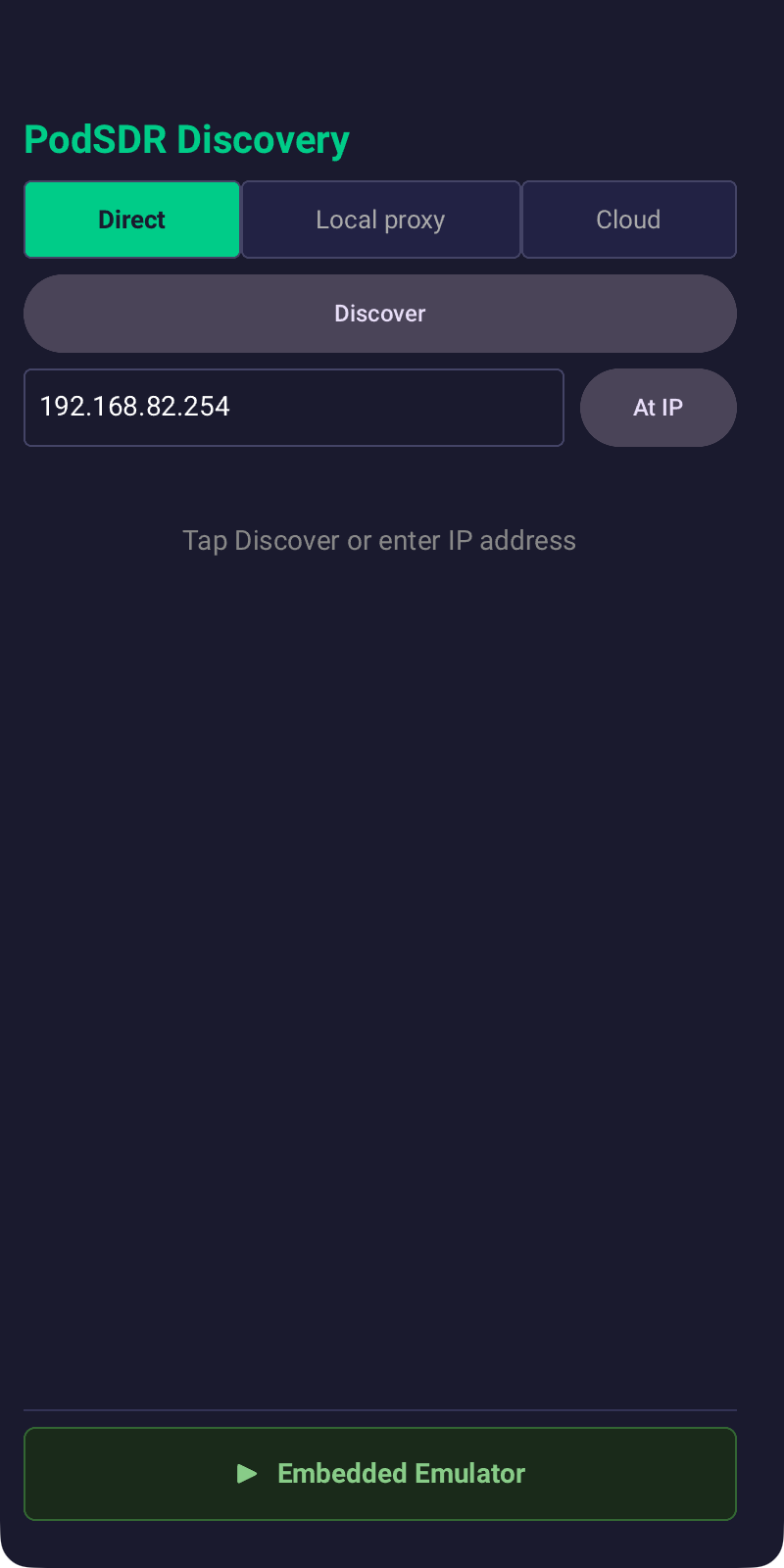
All three clients start on the same discovery screen and offer the same three ways in: Direct (UDP to an OpenHPSDR radio or the emulator on the LAN; desktop and Android only, since browsers cannot do UDP), Local proxy (a proxy URL such as https://pi.local:8080), and Cloud (sign in to the broker and pick one of your proxies).
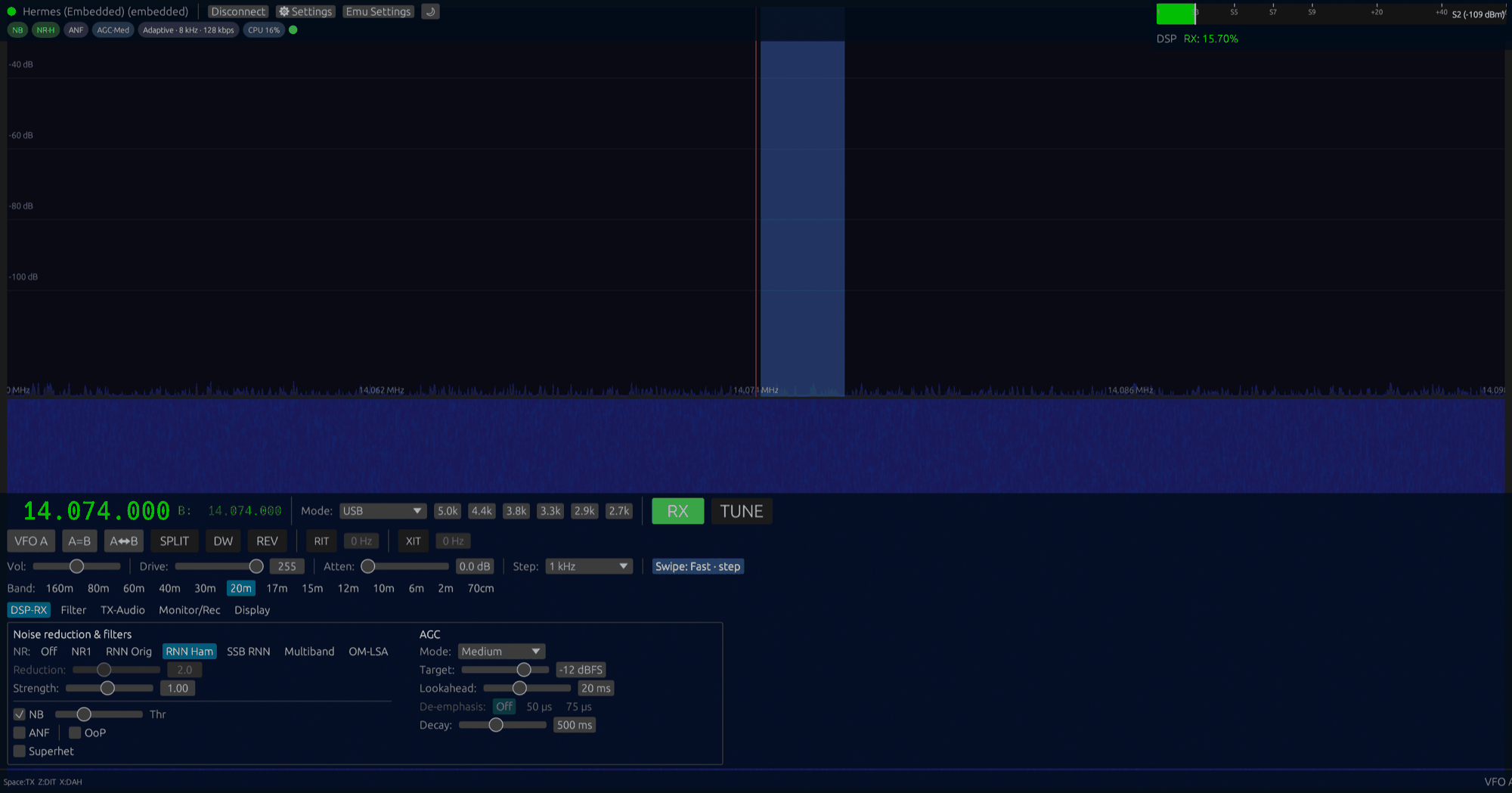
Once connected you get the same operating position everywhere: click or tap to tune, drag to slew, drag the filter edges in the passband, type a frequency, band buttons with per-band memories, S-meter with peak hold, and during transmit forward/reflected power, SWR, ALC and mic level. Modes are LSB, USB, AM, FM, CWU, CWL, DSB, SAM, DIGL and DIGU. VFO A/B, split with quick DX offsets, RIT/XIT and dual watch are there when the radio supports them.
Each radio keeps its own profile, so connecting to a different radio restores that radio's frequencies, mode, DSP settings and calibration.
Operating remotely
Browsers cannot send UDP, so the proxy sits next to the radio and bridges OpenHPSDR traffic into a WebRTC data channel. On the LAN that is all there is to it: start the proxy, open its address in a browser, connect. Audio uses an adaptive PCM codec that follows the available bandwidth.
To operate from outside your network, start the proxy with the cloud uplink instead. It opens an outbound WebSocket to the broker at podsdr-broker.fly.dev and stays registered there. Clients anywhere sign in to the broker, pick the proxy, and the broker negotiates a WebRTC session between the two ends, through NAT on both sides. There is no port forwarding, no VPN and no dynamic DNS to set up. Session tokens are signed by the broker and checked by your proxy against the broker's public key, so another broker cannot be substituted. You can also run your own broker.
Pairing a proxy to your account is a one-time step:
- On the machine next to the radio, run
./run-cloud.sh shack(the name is what clients will show). - While the proxy is unclaimed, the launcher prints a short pairing code. Enter it in the Cloud panel of any client. The proxy is now attached to your account and stops issuing codes.
- Sign in from the web, desktop or Android client and connect to any of the proxy's radios.
The proxy only makes outbound connections (port 443 to the broker, UDP to its STUN/TURN servers), so no inbound firewall rules are needed. Ports are listed in the reference, and the cloud setup is described step by step in the documentation.
Signal processing, keying and digital modes
There are two DSP backends behind the same controls: a floating-point one used on desktop, in the browser and on the server, and a fixed-point Q15 one that is lean enough for an RP2040 or ESP32 and doubles as a low-power mode on phones.
- Noise reduction: NR1 (spectral subtraction), RNNoise, and two RNNoise models trained on ham SSB and classic ham audio, plus a multiband expander.
- Noise blanker with threshold, automatic notch filter, AGC (fixed, long, slow, medium, fast) with adjustable target and decay.
- Sharp FIR filters with presets per mode and draggable custom edges; CW pitch, rise time and click-tune offset.
- TX chain: mic gain with auto and a 5-second “tune mic” helper, CESSB, ALC, compressor (legacy or spectral), 3-band EQ, leveler, VOX.
- Voice keyer with four slots, TX monitor, a 10-second TX preview loop, and RX recording to 48 kHz WAV.
- CW keyer: iambic, paddles over USB serial or MIDI, adjustable WPM and pitch; CW macros.
- FT8, FT4 and FT2 decoder, multi-pass with signal subtraction, compatible with WSJT-X. Also available as a standalone web page.
- Hamlib
rigctld-compatible server on port 4532, so WSJT-X, JTDX, fldigi, N1MM+ or Log4OM can control the radio. - Connect and disconnect hooks on the proxy host, for things like powering the rig or keying an antenna tuner; relay scripts for Raspberry Pi GPIO are included.
- Keyboard and MIDI control mapping.
Trying it without a radio
Every server bundle includes podsdr-emu, which answers Protocol 1 discovery on your LAN like a Hermes Lite and streams synthetic I/Q. The desktop program, the web client and the Android app also each have an embedded emulator: switch it on and connect, with no network and no hardware. That is what the screenshot at the top of this page shows.
Download
Bundles for Windows, macOS, Linux, Raspberry Pi and Android are on the download page, with SHA-256 checksums. Nothing is installed system-wide: unpack, run, and delete the folder when you no longer want it.